Start SEO (Search Engine Optimization) for your website now. The longer you wait
to start SEO (Search Engine Optimization),
it becomes harder to get high ranking than your competitor’s websites. It is
also necessary to attract more visitor / traffic for website.


Is SEO Expensive?
Absolutely No. if you are building
your own website / blog and you’re familiar with SEO (Search Engine Optimization) requirements then there is no problem
that you cannot get good result. Just create good and unique contents and
promote website in all search engines. Good relationship does not need to
invest.
But if you hire an SEO expert for the
optimization of website / blog it may become costly because it depends on the
hiring rates of SEO expert.Does SEO Give Instant Result or Not?
Does SEO Give Instant Result or Not?
SEO (Search Engine Optimization) is long terms work with patience. The
result of SEO (Search Engine Optimization)
depends on the uniqueness and health of contents. It may take few weeks or
months. But if you start today then it will be achieved tomorrow.
What Is Off-Page Optimization?
The
work which is to be done on other websites is called Off-Page Optimization. It
is a strategy in which you can used social media marketing (Facebook, twitter,
LinkedIn, MySpace etc), link building, guest posting, lead generation, press
release, classified ads posting, blogging, Back linking, Do-follow back link
etc.
Is SEO Expensive?
Is SEO Expensive?
What Is On-Page Optimization?
This is the most important in SEO (Search Engine Optimization).
Optimization on the site is called On-Page Optimization. In this type of
optimization for website/blog following point is optimized:
- URL of website
- Title of website
- Headings of website
- Proper use of keywords
- Image optimization
- Body Layout of website
What Is Off-Page Optimization?
How Many Types of SEO?
SEO
(Search Engine Optimization) has two
sets of optimization On-Page
Optimization and Off-Page
Optimization. For success both type of optimization is essential for any
website / blog.
What Is On-Page Optimization?
What Is On-Page Optimization?
Why SEO is required for website and blog?
SEO (Search Engine Optimization) is required for the search engine
ranking. When a website/blog is properly optimized, all search engines
categories the website/blog and give ranking to all web pages on a
website/blog. Due to SEO (Search Engine
Optimization) all search engines directed heavy traffic to website/blog.
How Many Types of SEO?
How Many Types of SEO?
What Is Search Engine Optimization? SEO
Web Guide
foremost objective is to provide right direction, broad vision and guidance in
the field of Search Engine Optimization
(SEO). In this article Web Guide provides tips for new web developer in
the field of SEO (Search Engine
Optimization). Following tips are very helpful when you are optimizing your
website or log.
What is SEO?
SEO is the short form of Search Engine Optimization. It means that
a web developer optimize and design website/blog as per the requirements of all
search engines especially for Google, Yahoo and Bing. Search engine
optimization (SEO) can also be explained as strategies and methods used to make
sure that your website are available for search engine. If a website/blog is
optimize regularly and search engines give organic high rank to that website. In
this way a great traffic will visit that website organically.
Creating excellent content
Publishing
that excellent content
keywords Research
keywords Research
Keyword analysis
Link building
Improve link popularity
Use social media
Create links on website such as
Facebook and Twitter
Microsoft Word 2007 Lesson 1
Web Data Guide provide the free online classes of
Microsoft Word. This is first online class. After completion of these online classes, everyone
will be proficient in Microsoft Word independently.
Microsoft Word 2007
Microsoft
Word is data processing software. It uses to type mails, letters, reports, and
other office or personal documents. Microsoft released several versions of MS
word but here this tutorial teaches you basics of Microsoft Word 2007.
Microsoft Word 2007 is so different and updated from the previous versions of
Microsoft Word.

Let’s
start the lesson. First of all, install the MS Office 2007 in your computer. Open
the Microsoft Word 2007. The
Microsoft Word 2007 opening window appears look like the image below. However,
it can be a little different due to the window’s setting of your computers.
Microsoft Office Button
First
button, in the upper-left corner of the MS Word 2007 window is the Microsoft
Office button. On click this button show a menu of different functions. This menu
uses to create new files, open existing files, save files, publish files, print
the files, and perform many other tasks.


Quick Access Toolbar
Next
button in Microsoft Word 2007 is Quick Access toolbar. The Quick Access toolbar
provides easy access to use commands frequently. Save, Undo, and preview buttons appear on the Quick Access toolbar by default. These
buttons can be increased by clicking arrow sign “v” on the right side of tool
bars.

Title Bar
Next
is the Title bar of MS Word 2007. Title bar displays the title of opened
document on which you are presently working. In the image document's name is
Microsoft Word Learning Lesson 1. Save the documents with the unique names. These
document names show on the Title bar of MS Word document.

Commands
are used to take required work from Microsoft Word. Below the quick tool bar
“Ribbon” tools bar is used in Microsoft Word 2007. This Ribbon bar contains
several tabs; each tab contains a group of related command buttons. Some of
them are following:
- Home tab use for font/style selection for text and paragraph setting in document.
- Insert tab use to insert tables, links, illustration, header, footer, symbols and page selection.
- Page Layout use for themes, page setup, page background and paragraph spacing
- References use for tables of contents, footnotes, citation captions and index.
- Mailing use for creates labels, mail merge, previews results and inserts fields.
- Reviews use for proofing, comments, tracking and changes, etc.
- View use for document views, thumbnails, zoom, windows and macros.

Each
tab contains a dialog box launcher in the right bottom corner of tab group.
Dialog box launches additional related commands.
Microsoft Word 2007 Lesson 2
Welcome to Web Data Guide free online classes. This is second online class on Microsoft Word 2007. In first class lesson we discuss on Microsoft Office Button, Quick Access Toolbar, Title Bar and Ribbon. Now we start Microsoft Word 2007 Lesson 2
Microsoft Word 2007 Lesson 2

Ruler uses to adjust the width of
document. If the ruler is not visible on your word document, then follow the
following describe steps:
Click on “view” tab in Ribbon tool’s
bar.
Find
the “Ruler” check box in “Show/Hide” group.
Click
the “Ruler” box.
Now
ruler is visible on word document.
See
the following image for detail guidance.

A
plain area below the Ribbon tools bar is located. This plain area called the
Text Area. The text area is used to type all require data.
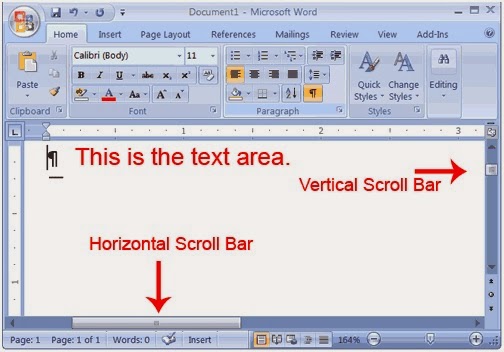
The Status bar is visible to the right
bottom of MS Word. Status Bar provides following information:
How many pages existing document
contain.
How many words existing document
contain.

MS
Word 2007 gives option to display document in five views: Print Layout, Full
Screen Reading, Web Layout, out line and Draft.
- Draft view is the normal used view. Draft view is used to rapidly edit document.
- Web Layout view is used to see document as it would come into view in a browser.
- The Print Layout view is used to see the document as it will appear when it is printed.
- Full Screen Reading Layout view is used to make document more comfortable while reading.
- Outline view is used to show the document in outline form.

There
are 2 options in MS Word 2007. First on is to go to the “view” tab on Title
bar. Click the View tab. Select the require view.
Tips To Earn Money from Blogging
Making money on internet through website or blog has
become a profession and is not so easy but not so difficult. If anyone is looking for some ways on internet to get some
extra earning then Blogging is the one of the best and simplest way for getting
earning online. If you are looking, how can you make a blog? See the article “Blog learning lectures” in Web Guide which guide how can you make a free blog on
Blogger.
In
this post we will focus on the attitude and how you can get start work. Web
Guide gives you guidance and tips that will give you support in making earning
on blogs.
First
of all make a list of all topics in which you can write with passion. You can
find on internet lots of web pages on all topics and already existing websites
are attracting visitors. That viewers or audience are very valuable for those
and they try their best to keep increasing them. In this scenario you must
choose a topic for blogging in which you can write a lot and you must have a
deep research on it because you have strong competitors on this way.
 Second tip is give importance to audience
problems. It means you have to focus on the problems for viewers which are
related to your blogging topic and what are the questions from the audience that
they want to get their problem’s answer. Focus on pin point because audience
only wants the solution for their problems. It does not matter from where they
get answers.
Second tip is give importance to audience
problems. It means you have to focus on the problems for viewers which are
related to your blogging topic and what are the questions from the audience that
they want to get their problem’s answer. Focus on pin point because audience
only wants the solution for their problems. It does not matter from where they
get answers.
Third
tip is about confidence. Do not think that you are a new in blogging just start
from now and proceed with passion and keep constant. Do not think that you are
not better. When you come in this field with the passage of time you will get
experience and this experience will help you to earn on internet and finally
you will find a good place for yourself on internet.
Fourth
tip is about web research. First find the already exiting websites and blogs on
your topic and analyze their websites and blogs. The way of building blogs and their
focus point. Assess them and get yourself one step forward with them. If they
work 2 hours per day, you must work more than 3 hours per day. If they publish
one article per day then you must publish more than two to three articles in a
day and this is the key of success.
Final words do not expect
success in one or two weeks. This is a long term process but the result is happy.
But it can be possible that you can get success with in weeks if you work hard.
But it depends on your quality of work and durability. Keep your eyes on your
topic and look to the future.
If you follow the describe
steps and there is no matter which can stop you and you cannot get success and
get earning on internet. For complete guidance keep watching Web Guide Index page.
Tips to Build Search Engines Friendly Website
Website is a source of advertising yourself
or your business on worldwide internet. Websites are launched by individuals or
companies for the promotion of their business. Every website owner wants to get
heavy traffic on his website from search engines. Therefore, it is necessary
for developer that he must build his website according to search engines. It is
very important that website must be Search engines and SEO friendly. The
structure, layout of website and most important the contents of website must be
optimized for search engines.
There are two ways to get traffic
from search engines to website, first one you pay search engines to display
your website ads which attract traffic for your website. Second way is hard but
the best way is to get top ranking in search engines. In this way search
engines display your website on top in search result and your website get
original and organic traffic by search engines. Organic traffic is free and
most suitable for relevant traffic. It is not a process of one or two days, it needs
time and you have to optimize your website regularly.

Always try to write your title clean and
descriptive. Title is the first impression of your website. Most important is
use your main keyword in the title of website. In this way all search engines
give propriety to your website. Use website sitemap and submit it to all search
engines webmaster to index all web pages of your website. In this way when
search engines crawled website, they crawl all web pages due to sitemap.
Always
try and make sure that all web pages of your website and their content are
unique. Search engines will not rank the duplicate contents.How to Optimize Images for Search Engine Ranking
Images
are the graphical representation of any topic. In the web development images
are mostly used in the articles. It is a natural truth that images can attract
lot of traffic for any website or blogs. This type of traffic come from the image
based search engines like Google images.If
website developers want to get this type of traffic or want to increase more
traffic, developer must need to optimize the images of website to get massive
traffic. But everybody does not know how to optimize the images and how search
engines redirect traffic to the websites.
Web Data Guide solve your this
problem. Just follow the following steps to optimize the images. It is easier to
do; once you do it then you can do it every time.

Alt Text for optimization
Alt
Tag is an attribute tag for images use in HTML (Hyper Text Markup Language). This
tag helps the spiders of search engines to know about the image topic. Actually
a human when see an image he can judge that what is written on it but spiders
of search engines cannot read the images, they know about the images through
the Alt Tag. There for web developer must use Alt Tag with each image. This
helps the search engines to index images in the website.
How to write image alt text?
This
process is very simple. This is helpful for search engines to understand the
images. Simply add Alt and Alt Text in all image tags. For example:
alt="add alt text here"
alt="add alt text here"
Complete
tag is following:
<img src="webdataguide.jpg" alt="SEO Tutorials" />
<img src="webdataguide.jpg" alt="SEO Tutorials" />
Image Size and website load time
Keep
size of images as small as web developer can do. Load time of website must be
less to get success in website SEO. If size of images are larger than it will
take more time to load which is not good for search engines and website search engines optimization. Final
word is that use less quantity and small size of images without sacrificing worth
of lessons.
Image File Name and Search engines ranking
Before
the uploading of images on website, select descriptive, related and desire
image name for all images. This name will help to rank the image in search
engines. Almost when users search for any images they type selective keywords for
search. This is why developer uses keywords as name of images. Search engines
will rank high your images with your keywords name.
Image Caption
Although
there is not any direct relation of image captions with the search engine
ranking. However, it will help search engines to know about the image.
What is Social Bookmarking procedure?
 Social Bookmarking is used for following
reasons, first one is store links of required websites, second one is to tag
the websites and third one is to share your websites or other links on the
internet. Sharing of website links is used for SEO purposes and link building
strategy. Most significant benefit of Social Bookmarking is that you can access
all your share links from anywhere anytime on any computer.
Social Bookmarking is used for following
reasons, first one is store links of required websites, second one is to tag
the websites and third one is to share your websites or other links on the
internet. Sharing of website links is used for SEO purposes and link building
strategy. Most significant benefit of Social Bookmarking is that you can access
all your share links from anywhere anytime on any computer.
Web Data Guide gives guide line to you the step by step method of social bookmarking. How to get social bookmarking? All
of these websites are free of charge to use but need registration before begin
bookmarking. Follow
the following steps of social bookmarking.
- Find the social Bookmarking website
- Register yourself on website
- Email confirmation
- Log in on website
- Post new subject
- Add title
- Select accurate Category
- Add the tag
- Add your unique content
- Get a Preview
- Post you’re bookmarking
Every
social bookmarking will not provide instant approval. You have to wait for approval.
For example if you want to add “Web Data Guide” in your bookmarking list and you want to view it again in the future or want
to share with others friends then simply follow the above describe steps. Some most
important social bookmarking websites are below:
Del.icio.us
http://del.icio.us/register
http://del.icio.us/register
Face Book
https://register.facebook.com/r.php
https://register.facebook.com/r.php
Google bookmarks
http://www.google.com/bookmarks/
http://www.google.com/bookmarks/
Ping Website and Blog When Why and How
 Ping means this is a call for search engines that this websites or blogs have new content and search engines index that new web page. Ping tells all other directories that this ping website or blog contain new contents. When a website is submitted for ping, the search engines send their spiders and bots to crawl the website or blog. After crawl search engines index the new content of ping website.
How You Can Ping Your Website or Blog?
Why websites or blogs are submitted for ping? Web Data Guide gives answer of this question. When search engines index the new content after that website or blog will become visible in search results. When a website appears in search results its mean it will get traffic and this is the reason for which website or blog is submitted for ping.
When A Website or Blog Can Submit For Ping?
Next question, when a website or blog have to submit for ping. Web Data Guide gives answer of this question. You have to submit your website or blog for ping when you change layout or template. Also must do when new contents or new posts are added. But don’t submit your website for ping if you have not made any change in your website. If you have done it then it will consider as spamming.
Why Websites or Blogs Are Submitted For Ping?
Next question, how you can ping your website or blog. Web Data Guide gives answer of this question. Web Data Guide provides free access to following websites/ search engines/ directories which facilitate you to pin your websites or blogs.
First step on these websites is to fill out the required information on website like your website or blog Name, URL, Feed or RSS URL.
Second step is to click on submit or Ping button. This is the simple process to ping a website or blog in search engines and directories.
Subscribe to:
Posts
(
Atom
)